|
Home > Excel Topics > Validation Better Data Entry with Data Validation
|


What is Data Validation?
In Microsoft Excel, the data validation feature helps you control what can be entered in your worksheet. For example, you can:
- create a drop down list of items in a cell
- make dependent drop down lists
- set rules to restrict entries, such as a date range or whole numbers only
1) Drop Down Lists
First, see how to create a basic drop down list in a worksheet cell, in this short video. There are written steps on the drop down lists page.
After you know the basics, you can make advanced drop down lists. For example:
- Hide items that were previously selected, to prevent duplicates. In the screen shot below, Fred and Joe have already been selected, so their names are gone from the drop down list. There are written steps on the Hide Used Items page.
- Allow multiple selections from a drop down list, all in one cell. There are detailed steps, and a video, on the Data Validation Drop Down Select Multiple Items page.


2) Dependent Drop Downs
After you set up a basic drop down list, you can make a second drop down, that depends on what's selected in that first drop down.
In the screen shot below, if you select "Fruit" in the first drop down, the dependent drop down only shows items from the Fruit category.

There are detailed steps, and videos, on the Dependent Drop Down List page.
- 💡Tip: Before you make a dependent drop down, see my recommendations for which setup method to use, on the Best Dependent Drop Down Setup page.
3) Data Validation Rules
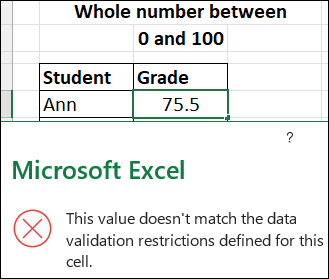
You can also create data validation rules for specific cells, like these two rules:
- Enter a date in the current year only
- Enter a whole number between 1 and 100
Values that don't match the rules can be blocked with a warning message.
- More Rules: There are many more examples, and detailed steps, on my Data Validation Criteria Examples page.
- Advanced Rules: If you need a complex data validation rule, see my Custom Data Validation Rules page. For example, prevent duplicates in a column, or limit the total sum in a range of cells.
Explore Data Validation Topics


Get Monthly Excel Tips!Don't miss my monthly Excel newsletter! You'll get quick tips, article links, and a bit of fun. Add your email, and click Sign Up. Next, when you get my reply, please click the Confirm button. I add this step to protect you from spam! |
Explore Excel Topics


Last updated: June 10, 2026 3:06 PM